A Scientific Look at How the Eye Color Simulator Works
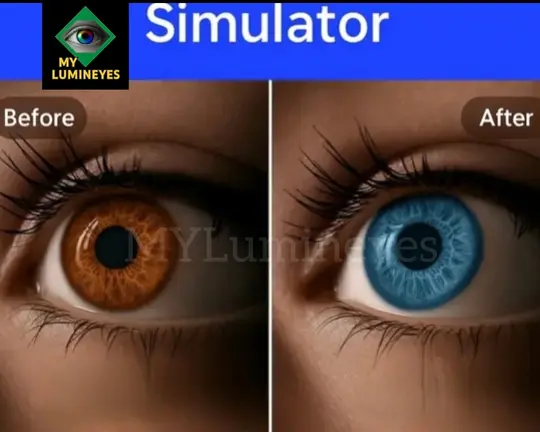
The Lumineyes eye color simulator is a visual tool that uses digital image processing to show how lighter or different shades could look on your own iris. It does not read your DNA or store any medical data. Instead, it analyzes the structure and lighting of your eye photo and applies calibrated color filters inspired by real post-Lumineyes results.
In real life, eye color depends on iris melanin density, pattern and how the tissue responds to laser over time. Because of this natural variability, the simulator can only provide an approximation of how lighter shades may look. You can also try a simple online version to change your eye color virtually and explore different shades before a medical consultation.
 How to Type Eye Color
 How to Type Eye Color
The model is fun and easy to use. People can choose gene sets that are close to the color of their own eyes. The feature lets them learn more about how these pairs work. This feature makes a complicated scientific idea easy to understand by letting users interact with it. It explains how various genetic variants influence what people perceive in the mirror. It’s similar to showing off your cellular makeup; it’s a really intriguing and informative experience.
Types of Eyes the Simulator Can Display
The simulator’s brilliance is that it can combine dominant and weak genes to produce all of the distinct hues of eyes. Users may alter the genetic ratios to observe the eye color change, perhaps from cool blue to deep hazel or from warm green to classic brown. This graphic research brings genetic inheritance to life, demonstrating how many various types of features someone might have. This experience serves as both a science lesson and an artistic activity, illustrating the elegantly complicated nature of our unique appearances.
How to Get the Most Out of Your Simulator
For the best experience, use a recent smartphone or computer screen with good brightness. Take a clear, well-lit eye photo and then try different shades and intensities. Pay attention to how each color interacts with your skin tone, hair color and natural iris pattern. This will make the visual result more realistic and useful.
Find the right eye color for you
Now this is where the fun really starts. Try out different eye colors and see how they look with the way you already look. To bring out the depth in your skin tone, a bright green might work. A smoky gray might add a touch of surprise. These models are more than just dress-up games; they teach you about your unique genetics and how they affect your appearance. For example, someone with blonde hair and pale skin might find that blue eyes make their features look better, while dark brown eyes could make darker skin tones stand out. Being aware of the differences can even help you choose your makeup, clothes, and hairstyles.
Last Thoughts about eye colors
Eye color genetics is more than just a science interest; it’s a personal journey into what makes each of us unique. Every gene pairing has a story to tell, and every difference shows how diverse human biology is. When you use an eye color simulator, remember that you’re not just choosing shades; you’re also learning about the complex web of genes that make you unique.